1. Why the iPoker network (PMU Poker & Betclic) is an EV+ goldmine
On the regulated French market, the iPoker network brings together two major operators backed by huge communities of sports and horse-racing bettors: PMU Poker and Betclic Poker. Their Spin & Go formats, called Twister and Twister Flash, benefit from a constant flow of recreational players in the evening and on weekends.
Yet many players don't fully exploit this network because iPoker hand histories are generated in XML format (not classic plain text), which often trips up poorly configured trackers during rebuys, seat changes or the rotation of Hero to the bottom of the table. SpinCrusher was built from day one around an ultra-fast native IPokerHandHistoryParser and betclic_parser.py engine.
2. Setting up Hand History recording on PMU Poker and Betclic
For SpinCrusher's Live Watcher to detect your hands in under a second and display the Win32 HUD overlay on your Twister tables, just check these two settings in your PMU or Betclic client:
- Open the Settings / Options of the PMU Poker or Betclic Poker client, then go to the Hand History tab.
- Tick "Save hand history locally on disk" (in French or English, SpinCrusher natively reads both languages!).
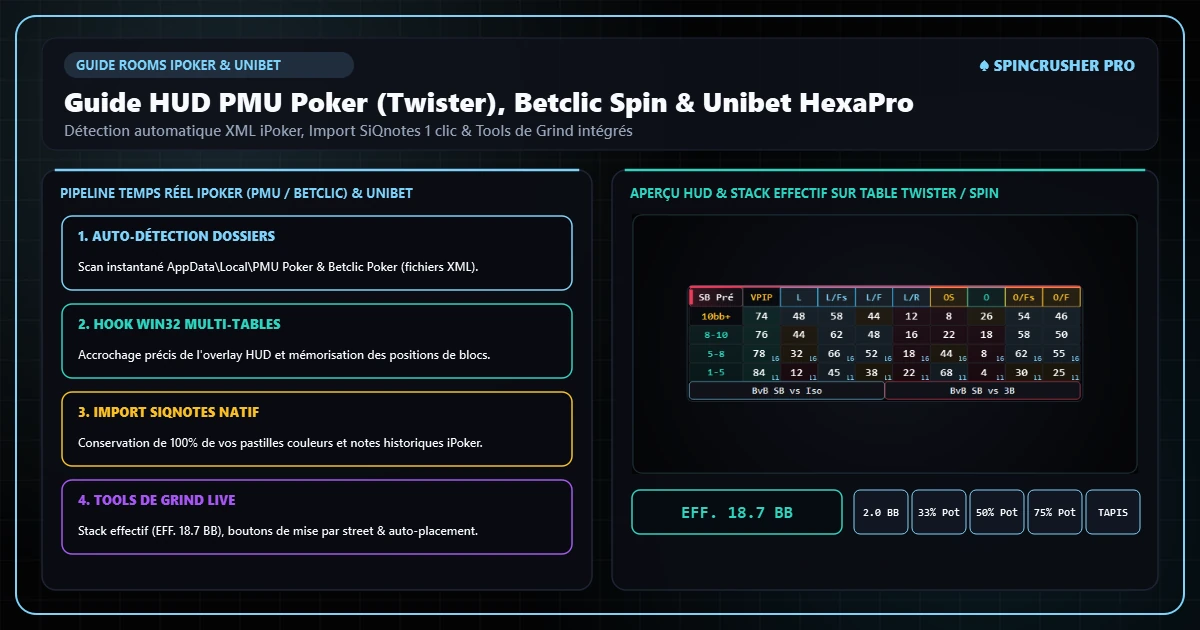
- In SpinCrusher, open the ⇩ Import & Data tab and click Auto Detection: the software instantly links your iPoker XML folders and registers your Hero nickname.

High-readability SpinCrusher HUD on iPoker Twister tables (automatic rotation of the 3 seats around Hero).
3. Calibrate your HUD stress-free with the Offline Table Simulator
Nothing is more frustrating than having to move your HUD panels while a real €25 Twister table is flashing. In SpinCrusher's ▣ Tables & HUD tab you have a built-in Offline PMU/iPoker Table Simulator:
- Display a 3-max test table with the 3 seats (Hero at the bottom in Slot 1, SB villain top left in Slot 2, BB villain top right in Slot 3).
- Drag and drop your stat blocks, your automatic In-Game tags banners and the TQE badge exactly where you want them.
- Your positions are saved as relative coordinates (automatically adapted if you resize your tables to play tiled on 4, 6 or 9 tables).
4. Import your iPoker SiQnotes tags and notes in 1 click
Many iPoker regulars use or have used SiQnotes to manage their player tags. SpinCrusher includes a native SiQnotes migration module: one click on "Import from SiQnotes…" in the Tags page recovers all your colors, labels and text notes, which coexist smoothly with SpinCrusher's 40 automatic Preflop/Postflop tags.
5. The 4 major tendencies of the PMU & Betclic Twister field to exploit
- Very high limp-call rate among sports bettors: isolate your value hands with larger sizings (3x IP / 3.5x–4x OOP) and watch for the automatic
[CS] Preflop call-stationbadge. - Massive overfold by ABC regulars in the Big Blind (
[FBB]badge): at iPoker €5 to €20 limits, many grinders multi-table for rakeback and fold more than 68% of their Big Blinds against a Button min-raise. - High flop donk-bet frequency (
[DNK]badge): don't be intimidated by 1-blind bets out of position, raise them aggressively with your pairs and draws. - Passivity on checked turns: use the Probe Bet Turn at high frequency when the Button forgets to c-bet the flop.
Frequently asked questions on this topic
Download the standalone SpinCrusher installer for Windows 10/11, import your PMU Poker, Winamax, Betclic or Unibet histories and your SiQnotes tags in 1 click, and enjoy 48 hours of full free trial with no credit card.