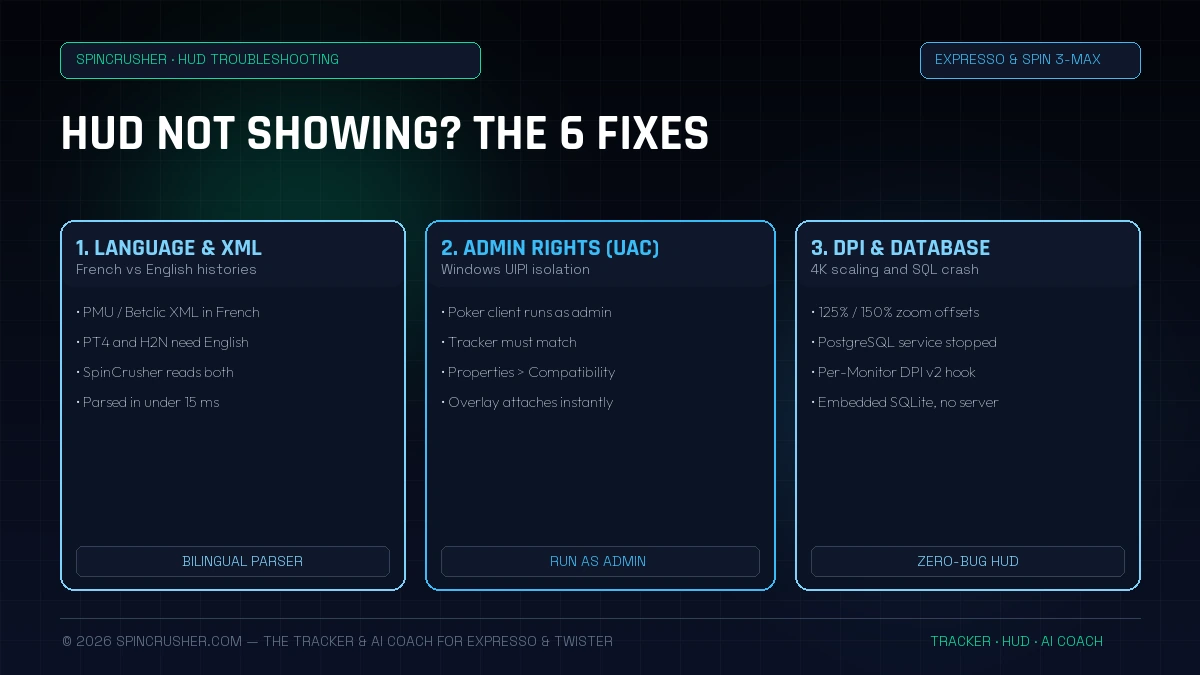
To show statistics on a poker table, two separate operations must succeed: 1) Importing the text/XML file written by the room to your SSD at the end of the first hand, and 2) The graphical hook (Win32 hook) of a transparent window on top of the poker client window. If either link is blocked by Windows, the HUD stays invisible.
1. Cause #1: The software language (the trap of French XML files on PMU and Betclic)
This is the number one cause of disappearing HUDs on the iPoker network (PMU Poker and Betclic Poker). When the PMU Poker client is installed in French, it writes XML hand histories with tags and labels localized in French (e.g. "Quitte", "Suit", "Relance" and decimal formats with a comma).
Foreign trackers such as PokerTracker 4, Holdem Manager 3 or Hand2Note only understand standard English syntax. The result: no hand is imported and the HUD never appears.
- Fix on older trackers (PT4 / HM3 / H2N): you must uninstall or reconfigure the PMU Poker client in English (Settings → System → Language → English) and restart the software.
- Native SpinCrusher fix: no action needed. SpinCrusher's parsing engine is natively bilingual (French & English). Whether your PMU or Winamax lobby is in French or English, all hands are recognized and parsed in under 15 milliseconds.
2. Cause #2: Administrator privilege conflict on Windows 10 and Windows 11 (UAC)
Windows User Account Control (UAC) applies a strict security rule called UIPI (User Interface Privilege Isolation): a process launched with standard (non-administrator) rights isn't allowed to read the geometry of, or overlay anything on top of, a window running as Administrator.
After an automatic update, the Winamax or PMU Poker shortcut often runs with elevated privileges. If your tracker isn't also launched as Administrator, it will see hands being imported into its database, but Windows will silently block the HUD from displaying on the table.
The 30-second fix:
- Right-click your poker tracker's icon → Properties.
- Open the Compatibility tab.
- Tick "Run this program as an administrator", then click Apply.
- Relaunch your tracker: UIPI isolation is lifted and the overlay attaches to the tables immediately.
3. Cause #3: "Save hand history" option unticked or AppData path moved
During some major room updates (notably the move to the new Electron/CEF-based versions at Winamax or an iPoker patch), two things happen:
- The "Save hand history to hard drive" box unticks itself in the poker client settings.
- The storage path switches from a
My Documentsfolder to the hidden directoryC:\Users\<YourName>\AppData\Roaming\...orAppData\Local\....
If your tracker watches the old empty folder, it detects no active table. To find the exact locations to check on each French room, see our dedicated guide: Where to find and configure your hand history folders on Winamax, PMU, Betclic and Unibet.
4. Cause #4: DPI scaling (125%, 150%, 200%) on QHD and 4K screens
Do you play on a high-density laptop screen or a 27"/32" QHD (2560×1440) or 4K (3840×2160) monitor? By default, Windows 11 enables a scaling zoom (DPI scaling at 125% or 150%).
On Xeester or PokerTracker 4, this scale factor creates a mathematical offset between logical (virtual) coordinates and physical pixel coordinates: your HUD labels then appear 15 centimeters away from the table, or even completely outside your screen (giving the illusion that the HUD isn't showing)!
- Manual fix on older trackers: Right-click the tracker executable → Properties → Compatibility → Change high DPI settings → Tick "Override high DPI scaling behavior" → Select "System" or "Application".
- SpinCrusher architecture: our HUD & Automatic Tagging engine and our Grind Tools & Auto-Tiling natively integrate the Windows
Per-Monitor DPI Awareness v2API. Your 7 positional blocks stay attached to the players' seats even if you move a table from a 4K screen (150% zoom) to a 1080p screen (100% zoom).
5. Cause #5: The PostgreSQL or MySQL service is stopped in the background
If you use PokerTracker 4, Holdem Manager 3 or Xeester and the HUD shows "Waiting for hands..." indefinitely, the culprit is very often the third-party SQL database server that crashed at Windows startup or was blocked by the Windows Defender firewall.
To check whether your SQL service is dead: press Win + R, type services.msc, look for the postgresql-x64-... or MySQL line and check that its status is "Running". If the service refuses to start because of a corrupted postmaster.pid file, you're in for a full reinstall. This is exactly one of the major reasons detailed in our Xeester vs PokerTracker 4 vs SpinCrusher comparison.
6. Summary: How SpinCrusher permanently eliminates these 6 failures
We designed SpinCrusher's technical architecture so that an Expresso or Twister grinder never loses another minute of session repairing their tracker:
| Classic HUD failure | Older trackers (PT4 / Xeester / H2N) | SpinCrusher automatic solution |
|---|---|---|
| PMU / Betclic lobby in French | ❌ The HUD fails (requires English on PT4/H2N) | ✅ Native bilingual FR & EN XML parser |
| AppData folder not found | ⚠️ Manual search through hidden folders | ✅ 1-click auto-scanner for all local accounts |
| PostgreSQL / MySQL server crashed | ❌ Total tracker and HUD outage | ✅ Embedded SQLite WAL engine (zero server) |
| 4K screen offset / 125%-150% zoom | ⚠️ HUD blocks shifted outside the window | ✅ Per-Monitor DPI-Aware v2 Win32 hook |
| Table resized in the middle of a rush | ⚠️ You have to reposition the boxes with the mouse | ✅ Real-time proportional vector anchoring |
| Room rules per site | ⚠️ Risk of forgetting to switch off a forbidden module | ✅ Per-room profiles (Winamax, PMU, Betclic, Unibet) |
As a bonus, once your HUD is up and running, SpinCrusher lets you go far beyond a simple VPIP/PFR display with our 200-Flop MDA Leakfinder, our 13×13 Range Trainer and live tracking of your 4 chip curves in the cEV Tracker & Slots Advisor.
Frequently asked questions about HUD display problems
Try SpinCrusher free for 48 hours: automatic detection of your Winamax and PMU Poker folders (in French or English), no PostgreSQL server to maintain and 40 automatic In-Game tags.