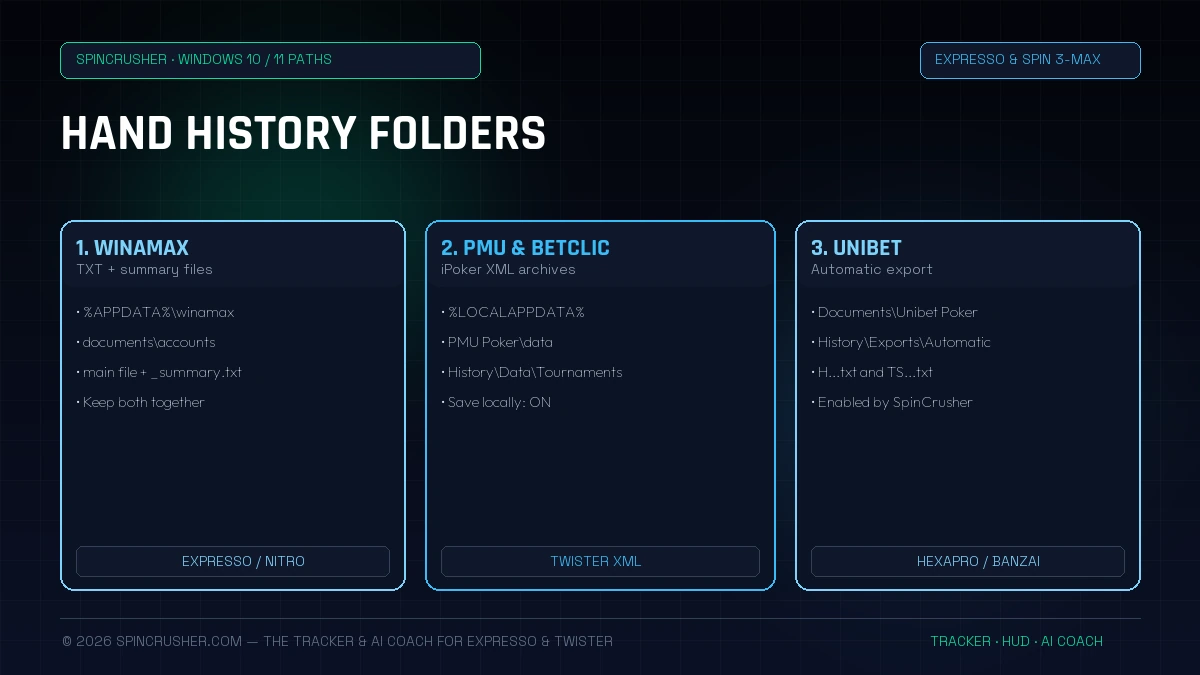
On Windows 10 and Windows 11, the AppData folder is hidden by default. Instead of digging through File Explorer, press Windows + R at the same time, then copy-paste one of the paths below using environment variables (%APPDATA% or %LOCALAPPDATA%) directly!
1. Summary table of Hand History folders by room (Windows 10/11)
Here is the quick summary of the default directories used by poker software licensed by the French regulator (ANJ) in 2026:
| Poker room | File format | Quick access path (paste into Win+R) |
|---|---|---|
| Winamax (modern client) | .txt + _summary.txt |
%APPDATA%\winamax\documents\accounts\ |
| Winamax (old path) | .txt + _summary.txt |
%USERPROFILE%\Documents\Winamax Poker\accounts\ |
| PMU Poker (iPoker) | .xml (Tournaments) |
%LOCALAPPDATA%\PMU Poker\data\ |
| Betclic Poker (Spin & Rush / Twister) | ExportHH .txt & .xml |
%LOCALAPPDATA%\Betclic Poker\data\ & Betclic export folder |
| Unibet Poker (HexaPro / Power Spin) | .txt (H...txt & TS...txt) |
%USERPROFILE%\Documents\Unibet Poker\History\Exports\Automatic |
2. Winamax: Where to find your Expresso and Expresso Nitro histories?
On Winamax, every Expresso generates two essential text files: the detailed actions file (e.g. 20261027_Expresso(123456789)_real_holdem_no-limit.txt) and the tournament summary file (..._summary.txt) which shows the multiplier drawn (x2, x5, x10, x1000) and your real winnings.
Exact path on Windows 10 and Windows 11:
- Standard path (AppData Roaming):
C:\Users\<YourWindowsName>\AppData\Roaming\winamax\documents\accounts\<YourWinamaxNickname>\history - Universal shortcut to paste into
Win + R:%APPDATA%\winamax\documents\accounts - My Documents variant (if set during an old installation):
C:\Users\<YourWindowsName>\Documents\Winamax Poker\accounts\<YourWinamaxNickname>\history
How to check that recording is enabled in Winamax: open the Winamax app → click the Tools / Options cog at the top → System / History tab → check that local saving of hands to the hard drive is enabled. If your HUD still doesn't show, see our 6 fixes for an invisible HUD.
3. PMU Poker (iPoker network): Where to find the Twister XML files?
On PMU Poker, the iPoker client doesn't use the Roaming folder but the AppData\Local folder, and stores hands as structured .xml files sorted by Twister tournament number.
Exact path for PMU Poker:
- Full path:
C:\Users\<YourWindowsName>\AppData\Local\PMU Poker\data\<YourPMUNickname>\History\Data\Tournaments - Quick shortcut (
Win + R):%LOCALAPPDATA%\PMU Poker\data
How to enable local saving in PMU Poker:
- Log in to the PMU Poker lobby and click My Account / Settings.
- Go to System → Hand History.
- Be sure to tick "Save hand history locally".
- Exclusive SpinCrusher advantage: unlike PokerTracker 4 or Hand2Note, which force you to switch the whole PMU software to English to read these XML files, SpinCrusher's parser natively reads XML generated in French as well as English!
4. Betclic Poker: Location of Spin & Rush histories (TXT) and Twister archives (XML)
On Betclic Poker, SpinCrusher's import engine supports both the new proprietary Spin & Rush (500 chips) format and your old iPoker Twister archives:
- New Betclic client (Spin & Rush):
ExportHH YYYYMMDD-...txttext files generated by the Betclic Poker client (containing the Spin & Rush ID, the prize pool and the hand-by-hand history). - Betclic Twister XML archives:
C:\Users\<YourWindowsName>\AppData\Local\Betclic Poker\data\<YourBetclicNickname>\History\Data\Tournaments(shortcut%LOCALAPPDATA%\Betclic Poker\data).
Once linked to SpinCrusher, all your Betclic Spin & Rush tournaments are imported into our cEV Tracker, Bankroll & Slots Advisor and into the Field Analysis & MDA Leakfinder module to study your 4 chip curves and Betclic pool tendencies (while automatically respecting Betclic's terms, which disable the live on-table HUD overlay).
5. Unibet Poker (HexaPro / Power Spin & Banzai): automatic activation of local export
On Unibet Poker, few players know that the Windows client (Relax Gaming) has a hidden feature that automatically exports hands to .txt files! At launch, SpinCrusher automatically enables the "settingStoreHHLocally": true setting in the %APPDATA%\Unibet Poker\local.dat configuration file.
- Unibet automatic export path:
C:\Users\<YourWindowsName>\Documents\Unibet Poker\History\Exports\Automatic - Files generated live: hand files
H<Date> T<TournamentID>...txtand tournament summariesTS<Date> T<TournamentID>...txt(supporting both 500-chip formats and the Banzai / Flash 200-chip formats).
Thanks to this real-time watcher, SpinCrusher gives you the exact calculation of your Unibet cEV, the compact Unibet HUD, our Grind Tools & Multitabling (auto-requeue of HexaPro games with an F9 emergency stop key, 15h Mental Shield) and our 13×13 Editor & Range Trainer.
6. How to back up your hands (Backup) and use the SpinCrusher Auto-Scanner
A database of 200,000 Expresso or Twister hands is worth gold: it contains the precise profiling of thousands of regulars and recreationals at your stake. Here are two essential computer hygiene rules:
- Never let a system cleaner (like CCleaner) empty your
AppDatafolder: always add%APPDATA%\winamaxand%LOCALAPPDATA%\PMU Pokerto the cleaning exclusions. - Use SpinCrusher's 1-Click Auto-Scanner: when you launch SpinCrusher, simply click "Automatically detect my rooms". The software instantly inspects your Windows variables, detects all your Winamax, PMU and Betclic nicknames, configures the Live Watcher and triggers In-Game Automatic Tagging (40 badges) across your entire existing history.
Frequently asked questions about hand history folders
Download SpinCrusher and let the installation wizard automatically link your Winamax, PMU Poker and Betclic folders. In under 2 minutes, discover your true cEV and the 40 automatic tags placed on your opponents.